
Showing posts with label bookmarking. Show all posts
Showing posts with label bookmarking. Show all posts
Clipboard Helps Save Web Content With Bookmark Service
ClipBoard is a new web service that helps user to save and share web content. It launched beta version in end of last year, and open to publish recently. With a bookmarklet, click it while you surf online, you can save content including search result, text, photo, video, chart, almost everything. The content will save in your account, you can publish and share them with other people. The content is the same as original one, also like a bookmark, takes you to original web page. It is really useful if you want to save content with bookmark function.

Snipplist, An Easy Way To Find, Share Article
Snipplist is a kind of online snipped bookmark service that helps users cut text from article, save and share it with other people. It uses a simple bookmarlet, only one click, you save or read late with an original link. You can use Facebook account to create an account, drag a bookmarklet to bookmark toolbar. When you found something interesting from article, just highlight text, and click "Snipp it!" on toolbar. It will be saved. Your bookmarked text and link will publish on Snipplist.


Microsoft Gives Out A Useful Translator Bookmarklet
Most people only know one language, if they really want to read an article in other language, the only way is to use internet translator, like Google Translator. If you use Chrome browser, it should be much easy because translator is built inside. Otherwise, you have to use another way to do it. Now, Microsoft develops a bookmarklet for other browsers, like IE or Firefox, just add this bookmarklet in to bookmark bar, click it when you need to translate a website, much easy to choose one from over 30 languages. Now you can read any foreign articles in your native language.


Share Your Favorite Web Page With Bo.lt
Bo.lt is an interesting web service that lets users to share web page with others, like shorten web address service, it gives out a shorten url, you can save them into your account as bookmark, they also put in to public list, everyone can click them. It seems a little bit confusing to me, like to make a simple thing to difficult. If you want to a try, go ahead.


Make Web Page A PDF File, Read It Later
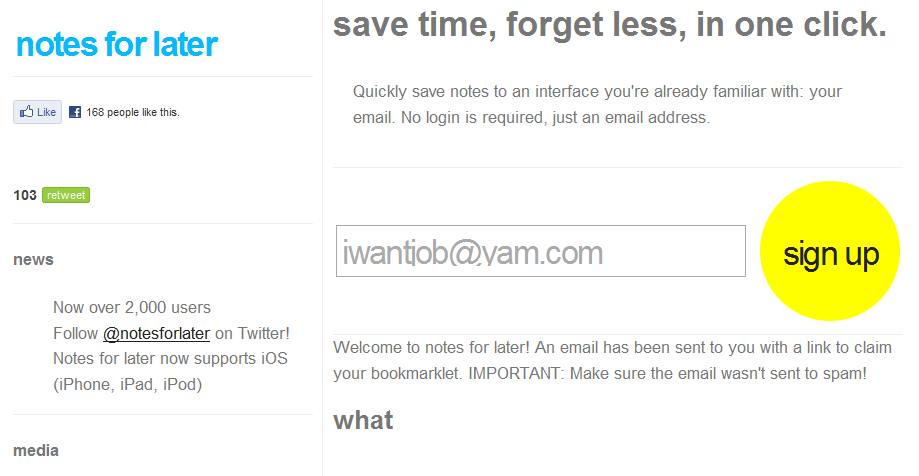
Notes For Later is a web tool that helps users read web page later, like other similar web services, it also offers a bookmarklet that easy to click on bookmark toolbar. But something is different, Notes For Later is not bookmark web page, it converts web page to a PDF file, and send it to you with email. You do not have to register, just type your email into a box, click "Sign Up", it will send you an email with a confirmation link. After click that link, it displays a web page with instruction. If you use Firefox, just drag yellow high light "make note 1" or "make note 2" to bookmark toolbar. That is all done. If you want to keep a web page and read it later, just click "make note 1", you can write a note, it will send it to you in email.


Use Email To Bookmark Web Page
Notes For Later is a web tool that allows you to bookmark web page in email. This is not a new web service, like Toread. Both services are similar, but Notes For Later does not require register an account. Just type your email address into a bar, click "sign up". It will send an email to you, click a link in your email. It will take you to another page and tells you how to set up. Add a bookmarklet into your bookmark toolbar. That's all you have to do.
Now you can click bookmarklet when you surf websites. Notes For Later will send you an email with a web address that you want to keep.

Now you can click bookmarklet when you surf websites. Notes For Later will send you an email with a web address that you want to keep.
Watch Online Videos Together On Radbox
Radbox is a web service that lets you put all online videos in one place, like Youtube, Hulu, or other online video sites. It offers a bookmarklet which can add on your browser's bookmark bar. You can add a video into your Radbox by click "Add to Radbox" button when you watch a video on some online video sites. Actually, it looks like "Watch Late" function, it is very good for people who want to save time to watch video together.

Radbox is not store any video, it only embeds video on its site.

Radbox is not store any video, it only embeds video on its site.
A New Way To Bookmark Web Links
Historio.us is a social bookmarking tool that offers you a new way to store website links as a bookmarking tool, it also combines a search engine that lets you search your bookmark history. It is a very interesting service, it has two versions: Regular user and Subscriber user. Regular users are free to use, Subscriber users have to pay $3 dollars a month.
First, you have to add a bookmarklet into bookmark toolbar. You can sign up a free account, you can add any site while you surf websites. the interesting point is Historio.us lets you search your bookmark, like a history you can check back. If you use Firefox browser, you can add Historio Search into your search bar, so it is easy to use it. Take a look these pictures below.


First, you have to add a bookmarklet into bookmark toolbar. You can sign up a free account, you can add any site while you surf websites. the interesting point is Historio.us lets you search your bookmark, like a history you can check back. If you use Firefox browser, you can add Historio Search into your search bar, so it is easy to use it. Take a look these pictures below.


Turn Web Page Without Click
I had a post that introduced a nice web page print solution, you can print a clean web page and save your ink. Today, I would like to tell you another nice solution that also comes from same website Print What You like. This solution called Page Zipper.
This is a pretty easy, but useful solution, keep you turn web page automatically without click. It has two ways: one is bookmarklet, you can drag it to your bookmark tool bar or favorite bar. Another one is to install a Firefox add-on.
Very easy to use, take a look this video below, you do not have to click "Next" page, just scroll down it will automatically display next page.
This is a pretty easy, but useful solution, keep you turn web page automatically without click. It has two ways: one is bookmarklet, you can drag it to your bookmark tool bar or favorite bar. Another one is to install a Firefox add-on.
Very easy to use, take a look this video below, you do not have to click "Next" page, just scroll down it will automatically display next page.
Put Your Favorite Internet Content Together
Enjoysthin is a place where you can track something you like on internet, such as text, photo, and web page. It offers a bookmarklet that can helps you add your favorite stuff into Enjoysthin.
It looks like difficult to use, but actually it is easy. Before you do anything you have register an account, it is free. Then, add a bookmarklet into browser's bookmark bar. You can click bookmarklet while you surf on any website, that will add content into your Enjoysthin. Actually, it is also a bookmark tool.

Enjoysthin是一个可以让你纪录你在网络上喜欢的东西,如文字、图片,以及网站。它提供一个bookmarklet来帮助你将这些东西添加到Enjoysthin上。
初看起来好像有些复杂,但是其实做起来并不困难。当然,在你做事前必须创建一个账户,这是免费的。然后,将一个bookmarklet添加到浏览器的书签工具条上。在你浏览网站的时候如果需要的话你可以点击它,这会将其添加到你的Enjoysthin上。其实,这也是一种方式的书签。
It looks like difficult to use, but actually it is easy. Before you do anything you have register an account, it is free. Then, add a bookmarklet into browser's bookmark bar. You can click bookmarklet while you surf on any website, that will add content into your Enjoysthin. Actually, it is also a bookmark tool.

Enjoysthin是一个可以让你纪录你在网络上喜欢的东西,如文字、图片,以及网站。它提供一个bookmarklet来帮助你将这些东西添加到Enjoysthin上。
初看起来好像有些复杂,但是其实做起来并不困难。当然,在你做事前必须创建一个账户,这是免费的。然后,将一个bookmarklet添加到浏览器的书签工具条上。在你浏览网站的时候如果需要的话你可以点击它,这会将其添加到你的Enjoysthin上。其实,这也是一种方式的书签。
Ambiently, A Web Discovary Engine
Ambiently calls itself a web discovery engine. It is not a regular search engine, it only provides relevant content directly related to the web page you are currently viewing.
Actually, Ambiently looks more like a web tool, you just add a bookmarklet onto your browser bookmark tool bar, it supports IE and Firefox browsers. After that, you can click this bookmarklet while you browse any web page, it will display web links which related web page you viewing. If you want back to original web page, you can click bookmarklet again. Now, Ambiently supports different language websites.


I had test this tool but it is not always relevant. Ambiently says it will improve it in the future.
Ambiently称自己为一个网络发现引擎。它并不是一个常规的搜索引擎,它仅仅在你浏览网页时提供一些与之相关的网站链接。
事实上,Ambiently看上去像一个网络工具,你只要将一个bookmarklet添加到浏览器工具条的书签中,它支持IE和Firefox浏览器。之后,在你浏览任何网页时只要点击工具条书签上的bookmarklet,它会马上列出一些与该网页主题相关的网页链接。如果你想回到原来的网页就可以再次点击bookmarklet。目前,Ambiently支持包括中文在内的多种语言网站。
我测试了一下这个工具,Ambiently并不是所有的链接都与主题十分贴近。它许诺会在将来改善这个工具。
Actually, Ambiently looks more like a web tool, you just add a bookmarklet onto your browser bookmark tool bar, it supports IE and Firefox browsers. After that, you can click this bookmarklet while you browse any web page, it will display web links which related web page you viewing. If you want back to original web page, you can click bookmarklet again. Now, Ambiently supports different language websites.
I had test this tool but it is not always relevant. Ambiently says it will improve it in the future.
Ambiently称自己为一个网络发现引擎。它并不是一个常规的搜索引擎,它仅仅在你浏览网页时提供一些与之相关的网站链接。
事实上,Ambiently看上去像一个网络工具,你只要将一个bookmarklet添加到浏览器工具条的书签中,它支持IE和Firefox浏览器。之后,在你浏览任何网页时只要点击工具条书签上的bookmarklet,它会马上列出一些与该网页主题相关的网页链接。如果你想回到原来的网页就可以再次点击bookmarklet。目前,Ambiently支持包括中文在内的多种语言网站。
我测试了一下这个工具,Ambiently并不是所有的链接都与主题十分贴近。它许诺会在将来改善这个工具。
Ffffoundtape, Share MP3 Music That Found Online

I do not know if you know about Ffffound, it is a web service that allow users to post and share their favorite photos that found on internet. It is popular for people who love image. Recently, it launches another sister site - Ffffoundtape, it is a MP3 music sharing site with a simple interface. Like Ffffound, Ffffoundtape also allows you use a bookmarklet to bookmark and share music that found on internet. Of course, you can just browse this site and click play button to listen its music. It always lets you curious to know what is next song.

我不知道你是否知道Ffffound这个网站,这是一个网络服务网站,可以让你发布和分享你在网络上发现的你所喜欢的图片。它在那些图片爱好者中比较流行。近来,该网络服务商又推出了另一个姐妹网站-Ffffoundtape,这是个MP3分享网站,它使用一个非常简单的界面。与Ffffound一样,它也让你使用一个bookmarklet来添加书签和分享你在网络上发现的音乐。当然,你可以浏览该网站直接点击播放按钮来聆听音乐。它总是让你好奇的是下一首歌会是什么。
Transport Bookmark From One Browser To Another One
I do not know if you like use different browsers but I do, I also know someone do either. My main browser is Firefox, sometimes I use Opera, IE, especially take them with my USB flash drive. But I always have problem while I use their bookmark, because all bookmark setup on my main browser, if I need check a bookmarked site with Opera I need open Firefox. It was really inconvenient.
I was looking for a web based bookmark server but that still is not perfect. I have some personal bookmarked sites like banks. shopping sites, and personal habit sites, I do not want put these sites on a public place.
Now, I found a software can help me do better job. Transmute is a nice software that helps you transport your bookmark from one browser to another. It supports all main browsers like Google Chrome, Firefox, IE, Opera and Safari. It is very easy to using, pick one browser that you want export, and pick another one that you want saved. It also allows you backup your bookmark.

我不知道你是否喜欢使用不同的浏览器,我喜欢,我也知道有些人也喜欢。我的主要浏览器是Firefox,但有时候我也使用Opera、IE,我喜欢用U盘带着他们。但是当我使用这些浏览器时总有一点不方便,因为我的书签时装在Firefox上,而我一旦要使用书签上的网站时总是要打开Firefox。
我曾经找过在线书签,但总觉得不太顺手。我的书签上有一些私人使用的网站,如银行、网络购物网站、和一些个人嗜好网站,我并不想将这些网站放到一个公共服务器上。
现在,我终于发现了一个软件可以帮助我。Transmute是一个不错的软件,它可以帮助我将书签从这个浏览器转到另一个浏览器中。它支持所有主流浏览器,如Google Chrome, Firefox, IE, Opera和Safari。它也非常容易使用,只要选择一个你想输出书签的浏览器,再选一个你想保存书签的浏览器即可。它也可以让你备份你的书签。
I was looking for a web based bookmark server but that still is not perfect. I have some personal bookmarked sites like banks. shopping sites, and personal habit sites, I do not want put these sites on a public place.
Now, I found a software can help me do better job. Transmute is a nice software that helps you transport your bookmark from one browser to another. It supports all main browsers like Google Chrome, Firefox, IE, Opera and Safari. It is very easy to using, pick one browser that you want export, and pick another one that you want saved. It also allows you backup your bookmark.

我不知道你是否喜欢使用不同的浏览器,我喜欢,我也知道有些人也喜欢。我的主要浏览器是Firefox,但有时候我也使用Opera、IE,我喜欢用U盘带着他们。但是当我使用这些浏览器时总有一点不方便,因为我的书签时装在Firefox上,而我一旦要使用书签上的网站时总是要打开Firefox。
我曾经找过在线书签,但总觉得不太顺手。我的书签上有一些私人使用的网站,如银行、网络购物网站、和一些个人嗜好网站,我并不想将这些网站放到一个公共服务器上。
现在,我终于发现了一个软件可以帮助我。Transmute是一个不错的软件,它可以帮助我将书签从这个浏览器转到另一个浏览器中。它支持所有主流浏览器,如Google Chrome, Firefox, IE, Opera和Safari。它也非常容易使用,只要选择一个你想输出书签的浏览器,再选一个你想保存书签的浏览器即可。它也可以让你备份你的书签。
Social Image Bookmarking Service

We all know about social bookmarking site like Del.icio.us, you can use it to bookmark any website. Do you know Vi.sualize.us? It lets you bookmark your favorite photos and share them with other people online.

Like Del.icio.us, you can use tag to search photos in Vi.sualize.us. It offers a extension for Firefox that allows you to use right click on a photo to add it in you bookmark. After you registered, you can download this extension. It should add your favorite photos to your bookmark easier than before. If you like collect photos maybe that is good way for you.

我们都知道社会性书签网站如Del.icio.us(美味书签),它可以让你非常方便地收藏你喜欢的任何网站并与他人分享。你知道还有一个网站Vi.sualize.us吗?它是一个类似美味书签的社会性书签网站,但仅仅让你图片到书签中并与他人分享。
与美味书签书签一样,它可以使用标签来搜索图片。它也提供一个Firefox扩展件,它可以让你用右键点击你喜欢的图片将其收藏到你的书签中。在你注册后就可以下载这个扩展件。它让你觉得将图片添加到书签中更方便。如果你喜欢收藏图片的话,这是一个不错的方法。
Deligoo = Delicious + Google?

Deligoo is an extension for Firefox and Internet Explorer, that helps you to search through your Del.icio.us bookmarks. It combines Del.icio.us and Google to create a search engine for Del.icio.us bookmarks. you can search keywords or a sentence in Del.icio.us bookmarks or Google. After you set up Deligoo you can use it which on tool bar of browser. But for me, I do not know what is different between both search engines. Does it little bit convenience? Maybe, I do not know.

Deligoo是一个适用于Firefox 和Internet Explorer的扩展件,它帮助你透过你的Del.icio.us书签来搜索。它组合了Del.icio.us and Google两个引擎来创建一个新的搜索引擎来搜索Del.icio.us书签。你可以搜索两个引擎中的关键词和短句。安装Deligoo后你可以在浏览器的工具条使用它的搜索条。但是对我来说它好像并没有什么特别之处,难道它更便利?我不知道。
Tags:
Read Later, Save Your Favorite Links
I read a lot of blogs everyday, sometimes I do not have time to read all, but I still want read them late. What can I do? Put them on bookmark, yes, maybe that is only way I can do. But the problem is your bookmark will be bigger from time to time. Instapaper offers a good way to makes it easier, it gives you a javascript that you can drag it to your bookmark toolbar, while you find interesting websites or pages you can click that Read Later button. It will save these page link to its server, if you have time you can log on Instapaper to read them. You can still keep or delete them. It is simple and quick.
我每天读很多的blog,有时候我并没有太多时间来读完全部的文章,但我仍然想以后再读。我该如何做?将他们放进书签,是的!也许这是唯一的方法。但问题是日子一长,你的书签会变得很庞大。Instapaper提供一个非常不错的方法来解决这个问题,它给你一个javascript,你可以将它拖到工具条上的书签中。每次在你浏览网站或网页时发现有兴趣的文章是可以点击这个Read Later按钮,它会将链接保存在服务器上,如果你有时间的话可以登陆Instapaper来读取这些文章。你可以继续保存或删除这些链接。非常简单和快捷。
我每天读很多的blog,有时候我并没有太多时间来读完全部的文章,但我仍然想以后再读。我该如何做?将他们放进书签,是的!也许这是唯一的方法。但问题是日子一长,你的书签会变得很庞大。Instapaper提供一个非常不错的方法来解决这个问题,它给你一个javascript,你可以将它拖到工具条上的书签中。每次在你浏览网站或网页时发现有兴趣的文章是可以点击这个Read Later按钮,它会将链接保存在服务器上,如果你有时间的话可以登陆Instapaper来读取这些文章。你可以继续保存或删除这些链接。非常简单和快捷。
Tags:
Laaik, South African Social News Site

Laaik is a social news and bookmarking site, that let user submit stories from websites or blogs, you can vote articles or bookmark them. Like other social news sites, Laaik has some categories such as blog, video, photo. Actually, it is not special for me, but most interesting point is Laaik based on South Africa, I have never hear social website from Africa before, that is why I post it here. I hope it will be better in the future.
Laaik是一个社会性新闻和书签网站,它可以让用户提交来自网站或blog上的文章,你可以评选或收入书签。和其他的社会性新闻与书签网站一样,Laaik有一些不同的分类如blog、视频、图片。事实上它并不特别,最感兴趣的是它是一个基于南非的网站,我以前从来也没有听说过非洲的社会性网站,这也是我为何要在这里提到这个网站。希望它以后会更好。
Daftdoggy, Save Browse Session
Daftdoggy is a web service that allows you to save, play back and share web browsing sessions. After you registered you can put a web address what you want surf on its browser bar, click "go", it will take you to that website as normal browser do. What is difference? Daftdoggy help you save it, so you can play back to see this website. Only thing you have to do is click "Save Session" button if you want recording. It seems another kind bookmark, but it not only capture main page and also do other page while you browse. You can put more describe site such as tag for every pages. After you saved, you can send a link to other people who can play back. It looks cool.
You can see this link below, and to know how does it work.
Living Online
Daftdoggy是一个网络服务网站,它可以让你保存、回放和分享你的网络浏览片断。在你注册后,你可以将想要浏览的网址输入它的地址条中,点“go”,它会如同一般普通浏览器那样带你去该网站。不同的是,Daftdoggy会帮助你保存它的路径,所以你可以回放这些片断。唯一你需要做的是,不要忘记点击“Save Session”按钮。它看上去好像是另一种书签,但并不仅仅抓取首页,而是你浏览的每个页面。你可以为每个网页加入具体描述如标签。在你保存后,还可以将链接发给他人分享。它看上去有点酷。
你可以查看下面的链接以了解它是如何工作的。
生活在网络中
You can see this link below, and to know how does it work.
Living Online
Daftdoggy是一个网络服务网站,它可以让你保存、回放和分享你的网络浏览片断。在你注册后,你可以将想要浏览的网址输入它的地址条中,点“go”,它会如同一般普通浏览器那样带你去该网站。不同的是,Daftdoggy会帮助你保存它的路径,所以你可以回放这些片断。唯一你需要做的是,不要忘记点击“Save Session”按钮。它看上去好像是另一种书签,但并不仅仅抓取首页,而是你浏览的每个页面。你可以为每个网页加入具体描述如标签。在你保存后,还可以将链接发给他人分享。它看上去有点酷。
你可以查看下面的链接以了解它是如何工作的。
生活在网络中
CoReap, Bookmarking, Sharing While You Surfing

CoReap is a social search and bookmarking add-on for your web browser. If you like surf and search online, and share some cool sites with your friends that tool is good for you. With CoReap, you can quickly bookmark websites of interest, and share them easily with your friends over a web search engine. You need download CoReap add-on to your browser, after that you can use it at once. You can manage all your bookmarks and your social search network of friends from the CoReap browser sidebar.

CoReap是一个社会性搜索和网络书签工具,它是一个浏览器插件。如果你喜欢浏览网络、搜索和与你的朋友分享一些酷的东西的话,CoReap就非常适合你。用CoReap,你可以非常简单快速地添加书签、搜索和通过搜索工具与朋友分享。你需要下载一个插件添加到你的浏览器中,然后马上就可以使用它。你可以在边栏上管理所有的书签和你的社会性搜索网络。
Bookmark Master, Mister Wong (Chinese)

Mister Wong is a social bookmark site (Chinese), that company based on Germany but it has different language site included Chinese. I was a little surprised about it does not has English site (only one simple page). Mister Wong German version is a largest social bookmark portal in Europe, that according to its website says. The Chinese version looks similar other Chinese bookmark sites, one nice feature is you can set your bookmark for personal or public. It also uses tags for quick search. This is a Simple Chinese version site, I do not know about German version, if you know German you can go Mister Wong German version, maybe it is better than Chinese version.

Mister Wong是一个社会性网络书签网站(简体中文),它是一个德国公司但有一些不同语言版本,包括中文。我有一点意外它没有英文版本(只有一个简单的网页)。据它的网站介绍,Mister Wong德文版是欧洲最大的网络书签服务商。中文版看上去与其他的中文书签网站并没有什么不同,有一个不错的功能是可以将你的书签设定为私人或公共使用。它也提供标签让你快速搜索。这是一个简体中文网站,我不知道德文版如何,如果你懂德文的话可以到Mister Wong德文版看看,也许它好于中文版。
Subscribe to:
Posts (Atom)

 Posts
Posts


