We know Youtube is a biggest video site on the internet, but if you are living in a country where is Non-English speaker, maybe your country also have local video site, like Youku, Tudou these two major video sites in Mainland China. Today, let me talk about how to watch some videos on Youku, Tudou without IP restriction.
Youku and Tudou are two major video sites in Mainland China (they signed agreement to merge to one recently). They are very popular in China and oversea like Hongkong, Taiwan, and some southeast countries, you can watch tons of video, TV show, movie, video music, but some videos like US TV show have IP restriction, only available in Mainland China. If you are living in outside Mainland China, how can you watch these videos?
Actually, it's easy! If you used Firefox browser, just install an add-on that called Modify Headers.
After restarted browser, open it on add-on list, type "X-Forwarded-For" and an any Chinese IP like "123.135.114.144" in to bars. Click "Save", it will be added in main window, double click it that can be switched. Green means "on", red is "off". Now you can go to Youku or Tudou, watch your favorite US TV shows.
Showing posts with label firefox. Show all posts
Quickjava, A Safety Add-On Of Firefox
If you are using Firefox browser, you should now it has lots of extensions, add-ons, these stuff make online surfing so easy, fun and safe. Some add-ons we have, like NoScritp for example, stops bad javascript code. It keeps online browsing safe because many bad codes wrote by JavaScrip. If you banned it can be working anymore. Today, I like to introduce another very good Firefox add-on that called Quickjava.
This add-on also stops JavaScript, not only that, it stops more codes like Flash, Silverlight, Images, Stylesheets. It has two benefits, one is safety, another one is speed up load web page. Very useful. After you installed this add-on, it will appear on toolbar, you can stop codes any time, just by one click.
Take a look these screenshots below, compare to the big difference.
Before use Quickjava
After used Quickjava
This add-on also stops JavaScript, not only that, it stops more codes like Flash, Silverlight, Images, Stylesheets. It has two benefits, one is safety, another one is speed up load web page. Very useful. After you installed this add-on, it will appear on toolbar, you can stop codes any time, just by one click.
Take a look these screenshots below, compare to the big difference.
After used Quickjava
Stop Social Networking Sites Track You
According to internet research report, most people don't care about internet privacy while they are surfing online, even they knew internet has some dangerous sites, and over-trust security software. They think they will survive online. Actually, something seem are not danger, but they play tricks that you never know.
ShareMeNot is an add-on of Firefox, it blocks some social networking button on websites, like Facebook, Google, LinkedIn, Twitter, Digg, StumbleUpon. Why should we have to block these buttons? Most people don't know these buttons track your online browsing activities on site, even if you never click the buttons and even you disable third-party cookies. If you really care about your online privacy, this is a good add-on to stop something track your internet behaviors. After you installed, you don't have to do anything, it automatically blocks these buttons on each website.
Use Cocoon To Protect Your Internet Privacy
Cocoon is an internet security web service that offers a special Firefox plug-in to make you browse websites safely. What does it can do for you? The main function is it stops websites to track you, warns you again when automatic download files, lets you create disposable email addresses when you register on websites, even uses its proxy transfer your data, so your real IP address never display on websites that you browsed.
Actually, Cocoon was a commercial service, but it changed and offers free service, so anybody can register an account, install a plug-in, and free to use it. After register an account, you can download a plug-in (only for Firefox) and install it. Restart browser, a new toolbar added on browser. Click power sign, sign in your account, everything will be working, your all browsing data will go to any websites by its proxy.
GoogleSharing, Stops Goolge Track Your Searching Behaviour
We all know Google is a good company that creates many useful, nice internet services, but something we still do not like, like internet privacy, Google always spies us while we are using its service, especially search engine. If you are really concern your online privacy you should use third application to stop Google tracks you.
Google Sharing is a new web service that offers a Firefox plug-in. It automatic chooses a proxy service while you use Google search engine, so Google does not know your real IP address where from. It is very easy to do, just download Firefox plug-in, restart Firefox. By default setting, Google Sharing is enabled with Google search. Now, you can search data with Google search. But, Google Sharing only works with Google search, it is not to Google personal services, like Chat, GMail, Checkout, Sites, Docs, Photos, Calendar, Reader, Health.
Google Sharing also offer an application that allows users to run own proxy service. If you have a web server you can download a file, and install it on your web server.
Google Sharing is a new web service that offers a Firefox plug-in. It automatic chooses a proxy service while you use Google search engine, so Google does not know your real IP address where from. It is very easy to do, just download Firefox plug-in, restart Firefox. By default setting, Google Sharing is enabled with Google search. Now, you can search data with Google search. But, Google Sharing only works with Google search, it is not to Google personal services, like Chat, GMail, Checkout, Sites, Docs, Photos, Calendar, Reader, Health.
Google Sharing also offer an application that allows users to run own proxy service. If you have a web server you can download a file, and install it on your web server.
Use A Firefox Add-On To Download Files That From RapidShare, MegaUpload
Sometimes I like download files on some file hosting sites, like RapidShare, MegaUpload. But most annoying thing is we have to wait, do some clicks. These kinds of sites have different download ways, free or pay for download. I never think they are worth to pay for download, so I have to use a special way to download.
RapidShare+MegaUpload Downloader is an add-on of Firefox, it helps users download files without harassment. It is only for free download file, it will automatic start download file. Of course, you only download file one by one, even keep web page open while downloading.
It is not only for download RapidShare, MegaUpload, RapidShare+MegaUpload Downloader also supports some other sites, like Mediafire, Depositfiles, Uploading, 4Shared.
RapidShare+MegaUpload Downloader is an add-on of Firefox, it helps users download files without harassment. It is only for free download file, it will automatic start download file. Of course, you only download file one by one, even keep web page open while downloading.
It is not only for download RapidShare, MegaUpload, RapidShare+MegaUpload Downloader also supports some other sites, like Mediafire, Depositfiles, Uploading, 4Shared.
Labels:
firefox
An Easy Way To Save Web Page To PDF File
This blog covers many useful internet tools, browser's add-on or plug-in. I like this kinds of tool because unlike application, you do not have to install them, or just simple add them to your browser.
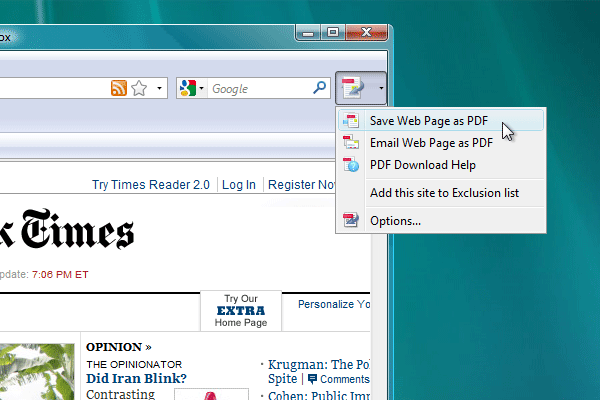
PDF Download offers some useful PDF solutions that can help you convert PDF files. Of course, several applications are useful if you needed, like PDF to Word, PDF to Excel, PDF Hammer. I think you can do PDF Downlod easier with a browser's add-on if you use Firefox or IE browser. This add-on can help you view PDF file online easier as a HTML page. Gives you a tool bar that saves web page to PDF file.
If you do not want to install add-on to your browser, a bookmarklet is also we can use without install anything, just drag a bookmarklet link onto your browser's Bookmarks toolbar, if you want save web page to a PDF file while you surf online, just click that bookmarklet button, wait a moment you can download a PDF file.
PDF Download offers some useful PDF solutions that can help you convert PDF files. Of course, several applications are useful if you needed, like PDF to Word, PDF to Excel, PDF Hammer. I think you can do PDF Downlod easier with a browser's add-on if you use Firefox or IE browser. This add-on can help you view PDF file online easier as a HTML page. Gives you a tool bar that saves web page to PDF file.
If you do not want to install add-on to your browser, a bookmarklet is also we can use without install anything, just drag a bookmarklet link onto your browser's Bookmarks toolbar, if you want save web page to a PDF file while you surf online, just click that bookmarklet button, wait a moment you can download a PDF file.
A Simplest Way To Watch Hulu Outside US
Hulu is a very good place to watch US TV shows, and video quality is also very good. But for most Non-US users, maybe it is not easy, you have to change your IP address look like in USA. Yes, we have some ways to do that, like proxy, VPN. But, there has a simplest way to watch Hulu without change your IP address.
How can we do that, here we go.
1, You must use Firefox browser, install a Firefox add-on - Modify Headers.
2, Open Firefox browser, click "Tools" on top toolbar. On menu, choose "Modify Headers", in a new window, type


3, click "configuration". Check "Always On". All done.

Try to watch a show on Hulu. This trick is easy, and works some countries, like Canada, England, but I am not sure it works on other countries.
How can we do that, here we go.
1, You must use Firefox browser, install a Firefox add-on - Modify Headers.
2, Open Firefox browser, click "Tools" on top toolbar. On menu, choose "Modify Headers", in a new window, type
X-Forwarded-For in first box. Type 12.13.14.15 in second box. Leave last box blank. Click "Add" button. 3, click "configuration". Check "Always On". All done.
Try to watch a show on Hulu. This trick is easy, and works some countries, like Canada, England, but I am not sure it works on other countries.
Simple Click To Download/Upload Your Files With FireUploader
FireUploader is a Firefox add-on that helps you to download or upload files from your favorite file hosting sites, like Youtube, Picasa, Box.net, Flickr, Facebook, Webshots. It combines Firefox browser, the interface looks like an FTP client, very simple to use, just sign in your account, click file to download or upload as FTP client. It reminds me another Firefox add-on: FireFTP.
After you installed FireUploader, you have to restart your Firefox browser, a small icon will appear on down-right side of Firefox. Click icon, the menu gives you two choice: Open full view or Open dropbox. One is a full version which looks like an FTP client, another one is a small window that lets you drag files.

Of course, you have to add your accounts into FireUploader. Just click "Manage Accounts", type your ID and password. Tick "Save password" that makes you easy to sign in. Everything seems simple after open this add-on.
After you installed FireUploader, you have to restart your Firefox browser, a small icon will appear on down-right side of Firefox. Click icon, the menu gives you two choice: Open full view or Open dropbox. One is a full version which looks like an FTP client, another one is a small window that lets you drag files.
Of course, you have to add your accounts into FireUploader. Just click "Manage Accounts", type your ID and password. Tick "Save password" that makes you easy to sign in. Everything seems simple after open this add-on.
One Click To Clean Your Browsing Trash
Click&Clean is an easy way to remove your browsing history and other tracks from your PC. Compare to other similar application, it builds in browser, so that makes simple and easy to clean internet trash, like history, cache, cookies, and other data. It has several versions for different browsers, like desktop version that integrates IE and Opera browsers. Two special browser plug ins for Firefox and Chrome. You can choose your one that suits your computer.
I have tested a plug-in with Firefox browser. After you installed plug-in, a small icon will add on toolbar. You can configure it from menu. Just one click it will help you to clean internet trash. Take a look these screenshots below.

I have tested a plug-in with Firefox browser. After you installed plug-in, a small icon will add on toolbar. You can configure it from menu. Just one click it will help you to clean internet trash. Take a look these screenshots below.
Check Target Site Before Click Shorten URL
Many people like to use shorten URL service, like Bit.ly, Goo.gl, Tinyurl.com. They are useful and convenience, especially for some social networking sites, like Twitter. But it also brings security problems, some spammers and malware use shorten URL services to hide their real targets. I have some posts that talk about how to check real web address that behind shorten URL, like Convert shorten URL to original one.
How to check out real targets which from some shorten URL services? I would like to introduce some services again. First choice, use some web based check real URL services.
Real-URL
Unshort
Unshorten
Untiny
Prevurl
Securi
I would like to recommend last one - Securi, because it also scan target URL, so it should be safe. Second choice, use some Firefox plug-ins or bookmarklets.
Long URL Please, it offers Firefox plug-in and bookmarklet. Install plug-in or drag bookmarklet to bookmark bar.
URL Sniffer, it is a bookmarklet, easy to drag it to bookmark bar.
How to check out real targets which from some shorten URL services? I would like to introduce some services again. First choice, use some web based check real URL services.
Real-URL
Unshort
Unshorten
Untiny
Prevurl
Securi
I would like to recommend last one - Securi, because it also scan target URL, so it should be safe. Second choice, use some Firefox plug-ins or bookmarklets.
Long URL Please, it offers Firefox plug-in and bookmarklet. Install plug-in or drag bookmarklet to bookmark bar.
URL Sniffer, it is a bookmarklet, easy to drag it to bookmark bar.
Feedly, Make Your Start Page Like A Magazine
I don't know if you use browser start page, like iGoogle or Netvibes. Actually, we have another choices: Feedly.
Feedly offers a browser plug-in, supports Firefox. it can make browser start page to a magazine style page. It provides integration with Google Reader, Twitter, Friendfeed, Delicious, Digg and YouTube.
Let us take a look Feedly. You can login with your Google ID or create a new account. Download Firefox plugin.

Choose your content

Add feeds

While you surf website you can click a small Feedly icon on browser address bar. It is very easy to use.
Feedly offers a browser plug-in, supports Firefox. it can make browser start page to a magazine style page. It provides integration with Google Reader, Twitter, Friendfeed, Delicious, Digg and YouTube.
Let us take a look Feedly. You can login with your Google ID or create a new account. Download Firefox plugin.
Choose your content
Add feeds
While you surf website you can click a small Feedly icon on browser address bar. It is very easy to use.
Stickr, Another Comment Sharing Platform

Last month, I posted an article that introduces Blopps which helps you to post comments with any websites. Today, I would like to tell you another similar service that called Stickr.
Stickr also offers a plugin for Firefox browser, if you do not install anything in your browser you can choose a bookmarklet, which is easy to frag it to toolbar. You need register an account, but you can also use some social networking ID without register an account, like Twitter, Facebook, Google. It is easy to use, just click "Stickr" button on toolbar, sign in your account, you can write down your comment. This is an independent sharing platform, if other users left comments you will see all.
Turn Web Page Without Click
I had a post that introduced a nice web page print solution, you can print a clean web page and save your ink. Today, I would like to tell you another nice solution that also comes from same website Print What You like. This solution called Page Zipper.
This is a pretty easy, but useful solution, keep you turn web page automatically without click. It has two ways: one is bookmarklet, you can drag it to your bookmark tool bar or favorite bar. Another one is to install a Firefox add-on.
Very easy to use, take a look this video below, you do not have to click "Next" page, just scroll down it will automatically display next page.
This is a pretty easy, but useful solution, keep you turn web page automatically without click. It has two ways: one is bookmarklet, you can drag it to your bookmark tool bar or favorite bar. Another one is to install a Firefox add-on.
Very easy to use, take a look this video below, you do not have to click "Next" page, just scroll down it will automatically display next page.
Labels:
bookmarking,
extension,
firefox
Use FireFound Track Your Computer
I carry my laptop all the time while I travel to somewhere, I saw many people like me, they carry their laptop or netbook computer on the road. You know something happening before you thought, if you are unlucky your could loose your laptop after you did not pay attention to. How can we do if we lost computer? Report cops but usually they can not do anything for you. Otherwise we can do something we can, like track your computer. How can we track our computer if we did not put anything on it? Yes, we have to do that.
FireFound can help us to track our computer. it is very simple, just install a small Firfix add-on. After restart Firefox, it will ask you to create an account, just fill user ID and password that you wanted. Configure this add-on setting, Tool -> Add-ons ->; FireFound -> Option, fill your email address that can send you an email for notice your computer move to somewhere, default distance is 2 miles. Tick everything for emergency it can delete all data that saved on your browser. That is all you have to do with Firefox browser.
If you want know where your computer is, you can go to FireFound, use your ID and password to sign in your account, it displays your computer physical address with Google Maps, and some information about local network.
It is a cool tool. But you still have to ask police to retrieve your computer.
中文读者请点击中文版 - 生活在网络中。
FireFound can help us to track our computer. it is very simple, just install a small Firfix add-on. After restart Firefox, it will ask you to create an account, just fill user ID and password that you wanted. Configure this add-on setting, Tool -> Add-ons ->; FireFound -> Option, fill your email address that can send you an email for notice your computer move to somewhere, default distance is 2 miles. Tick everything for emergency it can delete all data that saved on your browser. That is all you have to do with Firefox browser.
If you want know where your computer is, you can go to FireFound, use your ID and password to sign in your account, it displays your computer physical address with Google Maps, and some information about local network.
It is a cool tool. But you still have to ask police to retrieve your computer.
中文读者请点击中文版 - 生活在网络中。
How To Use Google Shorten URL Service Quickly
We know Google launches shorten URL service recently, that called goo.gl. But if you go to Goo.gl page, it shows you this sentence:
For me, I do not like too many toolbars on my browser, I think many people think same way too. How can we use Google Shorten URL Service without install a toolbar? If you use Firefox browser that would be much easy. Just go to this Firefox add-on page, install this add-on that called "Goo.gl Lite". After restart Firefox, right clicking on the Firefox toolbar area and choose “Customize”, drag Goo.gl icon to your Firefox toolbar. After it display on toolbar you can use it now. You can click this icon when you want shorten a long web address, it will convert a short address and copy it into your clipboard. You can direct paste it to somewhere.


中文读者请点击中文版 - 生活在网络中。
Google URL Shortener is currently available for Google products and not for broader consumer use.Google orders its toolbar to shorten URL, that means you have to install a toolbar from Google Toolbar.
For me, I do not like too many toolbars on my browser, I think many people think same way too. How can we use Google Shorten URL Service without install a toolbar? If you use Firefox browser that would be much easy. Just go to this Firefox add-on page, install this add-on that called "Goo.gl Lite". After restart Firefox, right clicking on the Firefox toolbar area and choose “Customize”, drag Goo.gl icon to your Firefox toolbar. After it display on toolbar you can use it now. You can click this icon when you want shorten a long web address, it will convert a short address and copy it into your clipboard. You can direct paste it to somewhere.
中文读者请点击中文版 - 生活在网络中。
Block Gmail, Yahoo, Hotmail Ads On Your Email Inbox Page
Nowadays, everybody have email. For me, I like choose big brand email services like Gmail, Yahoo Mail, Hotmail, and so on. These free email services all are reliable, good service quality, but they all are have ads with mail and mail inbox. It is really annoying, especial I hate Google AdSense scans my email and display ads on my inbox page. How can we stop it? Well, it is easy. If you use Firefox and these email services you may need read this article.
WebMail Ad Blocker is a Firefox add-on, it can stop Gmail, Yahoo Mail, Hotmail display their ads on your email inbox page. It will make your inbox page clean and little big space. Like regular Firefox add-on, just download and install it, restart your Firefox. You can also configure it as you want.
Go to Tool -> Add-ons -> Options, you can choose some elements you want display, and other parts will be blocked by this add-on. It is useful.
Take look these screenshots below:
中文读者请点击中文版 - 生活在网络中。
WebMail Ad Blocker is a Firefox add-on, it can stop Gmail, Yahoo Mail, Hotmail display their ads on your email inbox page. It will make your inbox page clean and little big space. Like regular Firefox add-on, just download and install it, restart your Firefox. You can also configure it as you want.
Go to Tool -> Add-ons -> Options, you can choose some elements you want display, and other parts will be blocked by this add-on. It is useful.
Take look these screenshots below:
Before block ads
After blocked ads
中文读者请点击中文版 - 生活在网络中。
Turn Google, Yahoo And Twitter To Tag Clouds Search
Search CloudLet offers a Firefox add-on that can turn Google, Yahoo and Twitter interface to a tag clouds page, it makes your search clear and fast.
Just download this add-on, after restart browser it will display tag clouds on page top while you search on Google, Yahoo and Twitter. You can also change settings on its option. this add-on works on Google web search, news, blog search, scholar and shopping. Yahoo web search, Yahoo news. Twitter search, my pages, other users' pages. You can also set up font size of cloud items.


中文读者请点击中文版 - 生活在网络中。
Just download this add-on, after restart browser it will display tag clouds on page top while you search on Google, Yahoo and Twitter. You can also change settings on its option. this add-on works on Google web search, news, blog search, scholar and shopping. Yahoo web search, Yahoo news. Twitter search, my pages, other users' pages. You can also set up font size of cloud items.
中文读者请点击中文版 - 生活在网络中。
TV Fox Makes Online TV So Easy To Watch

Do you like watch TV program online? I do, I like turn on my favorite TV program while I use my computer but not TV set. I use some p2p clients to watch different countries TV program, because it is free, if you use cable to watch these TV programs on your regular TV set you have to pay extra money for open these channels. I do not want, they are not my main TV channels, I do not want to pay them every month for only watch it a few times a week.
I know we can watch many TV program from internet, my cable fee included internet accessing, why not to use it for watch some foreign TV programs which I am interesting? Today, I would like introduce a Firefox add-on that setup a tool bar on your Firefox browser, only one click you can watch different TV programs around the world.
Simple go to TV Fox, or direct click here to download an add-on. After installed this add-on and restart Firefox browser, you will see a new tool bar appears on your browser, you can find different TV channels there. Just one click you can open a window to watch TV program. It has over 2780 Live TV Channels. It is easy to use.


你是否喜欢在线看电视节目?我喜欢在上网的时候打开电视节目,但不是普通的电视机,而是网络电视。我使用一些点对点网络电视客户端,因为他们是免费的,如果你用电讯公司的频道在普通电视机上观看这些频道的话就需要支付一笔费用。这些电视节目并不是我主要的电视频道,为何我要固定支付这些一个星期才看几次的频道费用?
我知道我们可以通过网络来看一些电视节目,我每月的电缆电视费中就包含了英特网接入费用,为何不利用它来看一些感兴趣的外国电视节目?今天,我要给大家介绍的是一个Firefox浏览器添加件,它会在浏览器上添加一个工具条,一键点击就可以观看一些来自世界各地的网络电视节目。
只要到TV Fox主页,或者直接点击这里下载一个添加件。安装后重启浏览器,你会看到一个新的工具条,还可以发现有不少电视频道。只要一个点击就可以打开一个窗口来观看电视节目。目前它有超过2780个电视频道,非常容易使用。
Make Google Search Personalized
Google is a powerful search engine, it is my first choice if I search something. But we also have some other search engines, how can we use them together with Google? Actually, we can use a Firefox/IE extension - Webmynd to customize search result.
After you installed this extension, it will ask you some search options. After restart Firefox/IE when you use Google you have two versions: Webmynd version and original Google version.
Webmynd version has a very simple interface, almost plain, but you can change page colors.

Original Google version almost same original one, but adds some sidebars which from other search sites, like Amazon, Youtube, Wikipedia, and so on that you can add them as you like.

Now, you can search something with some different search engines on one page. That is cool.
Google是一个强大的搜索引擎,它是我搜索时第一选择。但是我们还有其他的搜索引擎,如何才能将这些搜索结果结合在Google搜索页面上?其实,我们可以使用一个Firefox/IE扩展件- Webmynd将它客户化。
在安装这个扩展后,它会询问你一些设置选项。重启浏览器后使用Google时,你会有两种版本:Webmynd版本和原来的Google版本。
Webmynd版本的界面非常简单,几乎平淡,但你可以更换颜色。
原来的Google版本与过去并没有什么不同,只是添加了一些边栏供别的搜索引擎的搜索结果,如Amazon, Youtube, Wikipedia等等,你可以自行添加一些别的搜索网站。
现在,你可以在一个页面上显示不同网站的搜索结果,是不是很酷。
After you installed this extension, it will ask you some search options. After restart Firefox/IE when you use Google you have two versions: Webmynd version and original Google version.
Webmynd version has a very simple interface, almost plain, but you can change page colors.

Original Google version almost same original one, but adds some sidebars which from other search sites, like Amazon, Youtube, Wikipedia, and so on that you can add them as you like.

Now, you can search something with some different search engines on one page. That is cool.
Google是一个强大的搜索引擎,它是我搜索时第一选择。但是我们还有其他的搜索引擎,如何才能将这些搜索结果结合在Google搜索页面上?其实,我们可以使用一个Firefox/IE扩展件- Webmynd将它客户化。
在安装这个扩展后,它会询问你一些设置选项。重启浏览器后使用Google时,你会有两种版本:Webmynd版本和原来的Google版本。
Webmynd版本的界面非常简单,几乎平淡,但你可以更换颜色。
原来的Google版本与过去并没有什么不同,只是添加了一些边栏供别的搜索引擎的搜索结果,如Amazon, Youtube, Wikipedia等等,你可以自行添加一些别的搜索网站。
现在,你可以在一个页面上显示不同网站的搜索结果,是不是很酷。
Subscribe to:
Posts (Atom)