Grab this Widget ~ Blogger Accessories
Showing posts with label email. Show all posts

Convert Email Content To SMS For Cellphone With Mailbliss

Mailbliss is an email service, but unlike other email services, it converts regular email content to SMS that received by cellphone. You can create an email with several domains, like mailbliss.com, mailsplash.com, cellslice.com, cellbite.com, mailhulk.com, mailtwit.com. You can pick anyone of them, and hook up your cellphone number. If everything is OK, you can use your cellphone receiver email content as text message. This service is good for people who have unlimited SMS package plan with cellphone company.

Mailbliss supports multiple cellphone companies in different countries.

Clip Your Email

Zi.lc is a new web service that clips your email with digital number and code dialog, it will keep email on server. Only use codes to open it. I really don't know what this service for, I don't get. But anyway, if you want to clip your email, you have to fill this form, after clicked "FINISH", you can get code digital number, and code word. Use these codes to read your email on Zi.lc. Hard to do it? Yes, I think so.


Use An Email Client On Firefox Browser

Usually, we use two ways to receive email, one is to use website grab email, like Yahoo Mail, Hotmail, this way is only open your browser. Another way is to use a client receive emails store in hard drive, this way you have to install an email client. If you use Firefox browser, you can grab mails two in one way.

Simple Mail is an add-on of Firefox browser that lets you grab mails without open client. Just install this add-on, add your email accounts, you can receive emails now. If you know about email client you can use this add-on, almost the same as a common email client,supports pop3,  smtp, imap and multiple accounts.


Make Voice Mail For Free With SVMS

SVMS offers free voice mail, you can record voice up to 60 seconds, and 50 messages store in mail box. This website designs based on flash platform, it is good for Android cellphones.

First, you have to register an account. After that, you have to create your contact list first, then click "compose", you can click record button on the bottom. Last step is click "Send" button, all done. When receiver got mail, just click a link that bring receiver to SVMS, play and listen your voice mail.


Encrypt Your Text On Gmail With Encipher.it

Encipher.it is a text encryption tool that lets you to encrypt composed text with Google mail. This is an interesting tool, very simple to use, just drag a javascript "Encipher It" to bookmark bar on Firefox or IE browser. Actually, it has two parts, one is to encrypt, another one is to decrypt text.  If you want to encrypt after you created text mail on Gmail, click "Encipher It" button on bookmark bar. Type a password, click "Encrypt" button. The encryption is done. How receiver can decrypt this encrypted text after he got? For people who also use this tool, it is easy. Just click "Encipher It", type password that composer can tell them in other way, the content will be decrypted. If receivers who have never use this tool, they can go to Encipher.it, paste content to decryption box. Click "Encipher It", Type password,  it will be decrypted.


According to Encipher.it, it should work with other one, but I tried it with Yahoo Mail but it doesn't work anyway.

Claim Your Free Email Account With About.me

After AOL bought About.me, it opens mail service to users, they can get an email account with @about.me for free. The email service powered by AOL. If you have an account of About.me, it is easy to claim your free email. After you sign in, check "Offers", click button to active your account. Now, you got an email account with yourID@about.me. As AOL Mail, it also offers pop/imap/smtp, so you can use your emal client receive your email. About how to set up your email client, check this link.


Send Big File On Your Desktop With Kicksend

We know we can send files with email as attachments, but it also limits size of file. Some web services offer web space that allows you send big files. Kicksend is one of them, but it develops a desktop client, so you can use it send files on desktop. Of course, you can sign in on its website send files either. It offers 1GB space to send file for free, stores files 3 days on web server. You can get more space via some promotion steps, like invite friends, download client, link to Facebook, or tweets on Twitter, so you can get extra 550MB space.

The desktop client based on Adobe AIR platform, so you have to install Adobe AIR before you install client. Very easy to use client, supports drag and drop files with your mouse.


Hide Your Real Email Address

Not Sharing My Info is an email service, but it is not let you receive or send mail, only transfer your mail. Why we need this service if it can't receive and send mail? If you don't want to give out your real email address to public, you may need this service, you can receive mail without leak your real mail. Just create a new email with Not Sharing My Info, so your email will change to @notsharingmy.info, you can give out this email address, when it got mail, it transfers to your real email account. If you got spam mails, you can cancel that email address, and create another one without register.


MMMMail, Turns Disposable Email To RSS Feeds

MMMMail is a new disposable email service that offers a way to avoid spammer as other similar service, but it has a little bit difference, it converts email to RSS feeds that means after you create a disposable email address you can subscribe feed to check email, even you don't have to go its web page, just use RSS feeds reader to read email. Very easy.


Short Email With Social Function

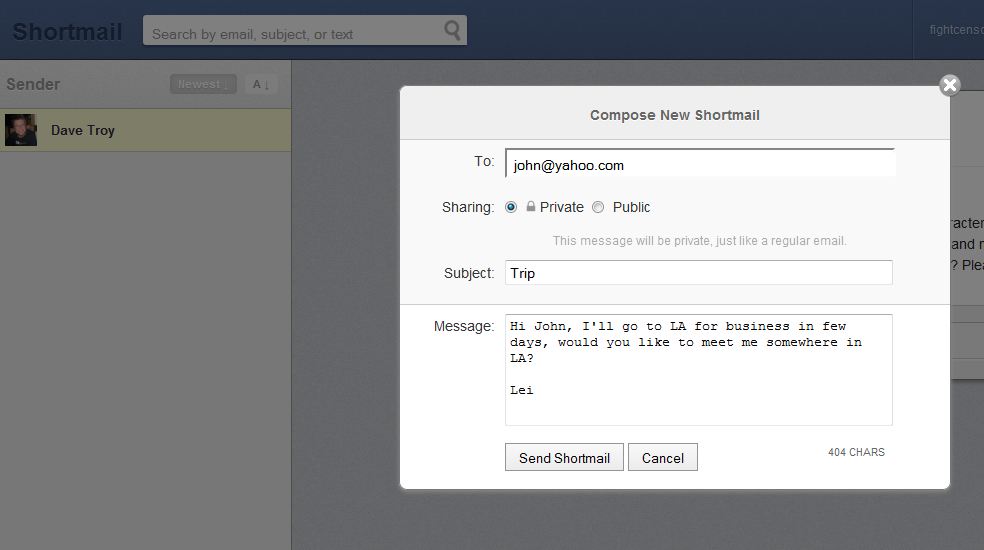
Shortmail is a special web service that mixed email and Twitter. Say it is email service because it is a real email service as others, you can send email, even offer pop3, imap, and smtp. But, it limits 500 letters each mail. Say it is social networking because it lets you choose private or public mail, if you chosen public your mail will be in public conversation mode that means everyone who knows mail URL can read and reply. You can use Twitter ID sign in, it gives you an email account with your Twitter ID, looks like, if your Twitter ID is "abcd", your Shortmail address will be "abcd@shortmail.com". You can send email as regular email service, the email receiver got that have a footer attached that says “This is Shortmail. Please reply in less than 500 characters; about 5 sentences.” So it limits length of mail, also for sender and receivers.

What is cool point of Shortmail? The public conversation, everyone can join it, this is social thing.


Make Web Page A PDF File, Read It Later

Notes For Later is a web tool that helps users read web page later, like other similar web services, it also offers a bookmarklet that easy to click on bookmark toolbar. But something is different, Notes For Later is not bookmark web page, it converts web page to a PDF file, and send it to you with email. You do not have to register, just type your email into a box, click "Sign Up", it will send you an email with a confirmation link. After click that link, it displays a web page with instruction. If you use Firefox, just drag yellow high light "make note 1" or "make note 2" to bookmark toolbar. That is all done. If you want to keep a web page and read it later, just click "make note 1", you can write a note, it will send it to you in email.


Secure Your Email With eCrypt

We know internet safety is very important, but many people still do not care about it, even to use regular web mail service to some sensitive information. Of course, most people do not know about how to secure their email. But eCrypt gives you an easy way secure your email.

How to use eCrypt? First, you have to register an account, you can add new identity that means you can use your own email address to send mail. Add contact address in "Address Book", it also supports import email address from main email services, like Gmail, Yahoo Mail, or from a CSV/XLS/XLSX file. Now, you can create email and send to somebody. Actually, it only sends an email with a link to receiver who need click link and type email address to read a web page. It also supports attach files, they will keep in server.


Use PrivacyBox Receive Online Message

This summary is not available. Please click here to view the post.

Add Your Tweet As Signature In Your Email

Twitter is popular, many new web services developed by it. TwitFooter is one of them, it helps you make a special email signature with your last tweet. It supports all kinds of html email page, like Yahoo Mail, Hotmail, Gmail, or email client like Outlook. Actually, you can paste it in any html page, like blog, web page. It is very easy to set up, just use your Twitter ID to sign in, you can choose show bio, last tweet, random tweet, or do nothing. Copy code and paste it to your email signature section.


An Easy Way To Download Mail Attachments

If someone sent me email with attachments, I like to save them in mail server because it saves my computer space, if I needed I can download them any time. But the problem is, my mail server keeps hundreds attachments, how can I download them at once?

Mail Downloader is a free software, it lets you only download attachments without bother mail content. It supports multiple mail servers, like Gmail, Hotmail/Live, Yahoo Mail, AOL, and other pop3/imap mail servers. If this application is running it can make schedule download attachments automatically.

I only concern about privacy, the official website says, it can be download attachments securely by encrypted channels, your email username, password, and email information only store in your computer.


Direct download Mail Downloader here.

Post Your Tweets By Email With Twitemail

If you like to use Twitter you should know about many Twitter tools. Twitemail is one of them. What does it doing?

It looks like a simple service, Twitemail allows you post tweets by email. Yes, just follow these steps:
1, Sign in with your Twitter ID on Twitemail.
2, Get a special send email address that means you have to send tweets to this address.
3, Create your tweets with your email service, like Gmail, Yahoo Mail, or others.
4, Twitemail converts your email to web page, it will post a short tweet on Twitter, also whole tweet will post on Twitter.


Send Secured Email With Lockbin

Lockbin is a web based email service that helps you send secured email to someone. Unlike regular email services always use unsecured code, very easy to captured by hackers. Lockbin is not just let you send email to somebody, it only lets you create email and keeps it on server, then, it sends a notice email to receiver who need to read your email with a link, receiver need a password which sender created.


Lockbin is not only offering web based service, it also lets you download a client, so you can create an email without open browser.


Download Lockbin from CNET.

Super Easy To Send A Big File With Zeta Uploader

Sometimes we need to send file to other people, if the file is small like a photo, we can use email to send with attachment. If we have a big file, we need think about to use other way, like upload a web space, then give a download link to receiver. Yes, it is not hard to find a file hosting service, but today I like to introduce a useful service that makes this job much easy.

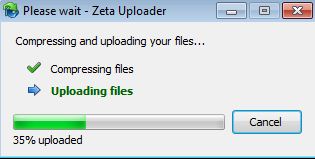
Zeta Uploader offers you an easy way to send big chunk file to other people. It is an all-in-one service, upload your file, type receiver email, it is all you have to do, even you do not have to register. Receiver will get an email with a file download link. Simple, super easy. You can upload files with a maximum size of 500 MB, the server will keep it 30 days, after that it will be deleted automatically. If you like to register a free account, you can use option to set up delete time, and a notice when someone download file.

It also offers a small piece application that allows you to use this service without go to its website. I like to use a portable version application, just click and use it, very simple and easy. If you like you can download application below.

Regular version, it needed to install.
Portable version, direct run it in any place.


Some Useful Disposable Email Services

Dispostable - you can take any ID or pick up a random ID with @dispostable.com. It will keep your emails in server two days, after that it will delete them.

Trashmail - you can create a temporary email with multiple domains, setup limited time or forward number, it will forward email to your real address in that time that you made. After that your temporary mail address will be deleted.

Yopmail - you can create and use any ID check mail with @yopmail.com, or some other alternate domains. After you have a temporary email, you can use an alias address that could not access your temporary email account.

Mailinnator - you can use any ID create and check your temporary email with @mailinator.com or zippymail.info. It will give you an alias address, a web page that you can access, or you can use RSS to read emails.

Mintemail - it creates a random email address for you, only keeps three hours, after that all mails will be deleted.

Meltmail - lets you create a temporary email address with @meltmail.com, it will forward to your real email address in three hours.


Tempinbox - create a temporary email with multiple domains, check email on website or use RSS.

Anonymbox - another temporary email service, it keeps emails 24 hours.

Spambox - it lets you to create a temporary email address that will forward to your real email account. You can set up a timer, after that it will delete your temporary account.

Backup Your Files With Email

BackupElf is a special web service that offers you backup your email with attachments. The conception is new, you do not have to upload your file to servers, just attach your file with email, and send it. You can send file size up to 4GB, but most mail service limited size. All backup emails are encrypted and backed up redundantly on Amazon AWS S3. It also offers a website to access your files.

BackupElf is a commercial web service, it has three level accounts, basic costs $4.95 per month, popular costs $9.95 per month, and premium $19.95 per month. But it also offers free account that limited 100MB of space. I think if you only want backup your text email, it should be enough.